


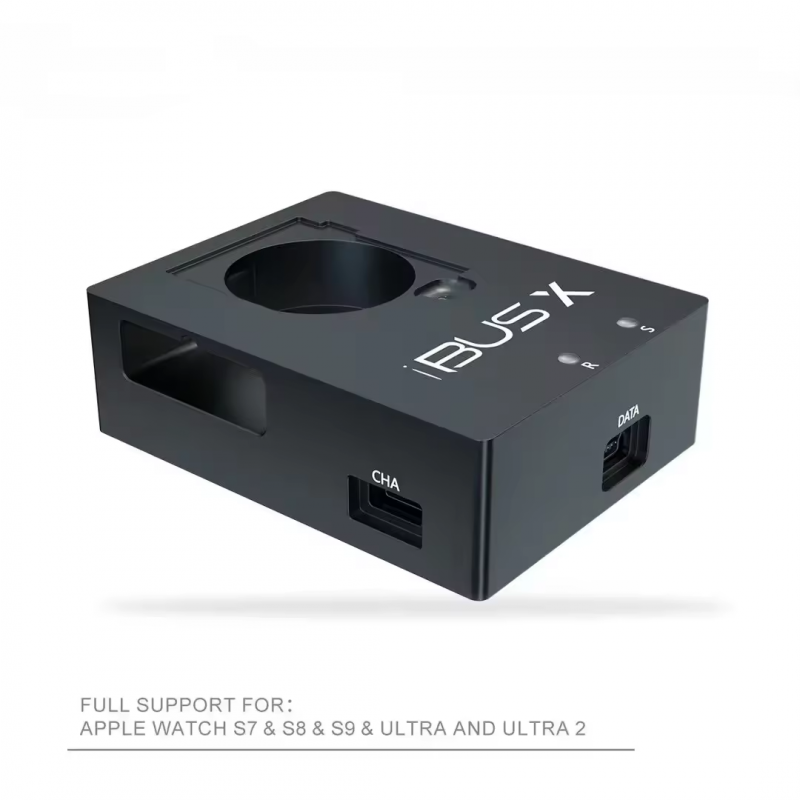
iBUS X Tool for Apple Watch S7 & S8 & S9 & Ultra and Ultra 2
iBUS X Tool for Apple Watch S7 & S8 & S9 & Ultra and Ultra 2
- $512.52
-
Quantity Price 1- $512.52
Product is In Stock
Quantity
Categories: Phone Repair Tools/ Boxes and Dongles/ Boxes
iBUS X Tool for Apple Watch S7 & S8 & S9 & Ultra and Ultra 2
This USB 2.0 iBus X tool connects your Apple Watch S7 & S8 & S9 & Ultra and Ultra 2 devices with a USB cable to your computer's USB port for restoring & upgrading and repairing software. also can fix related issues once for Apple Watch glass digitizer touch got a replacement
Functions:
- Support for Apple Watch recovery and repair software
- Support Apple Watch downgrade and upgrade with signed firmware
- Support Apple Watch Glass digitizer touch programming
- Support Apple Watch demo unit conversion to the normal unit. some watches may not be able to pair with your device after software due to different hardware
- Support for Apple Watch diagnostics
Features:
- Full Support for Apple Watch S7 & S8 & S9 & Ultra and Ultra 2
- For Apple Watch Series 7 as N187sAP (Watch 6, 6 - 41mm), N187bAP (Watch 6, 7 - 45mm), N188sAP (Watch 6, 8 - 41mm Cellular) or N188bAP (Watch 6, 9 - 45mm Cellular)
- For Apple Watch Series 8 as N197sAP (Watch 6, 14 - 41mm), N197bAP (Watch 6, 15 - 45mm), N198sAP (Watch 6, 16 - 41mm Cellular) or N198bAP (Watch 6, 17 - 45mm Cellular)
- For Apple Watch Series 9 as N207sAP (Watch 7, 1 - 41mm), N207bAP (Watch 7, 2 - 45mm), N208sAP (Watch 7, 3 - 41mm Cellular) or N208bAP (Watch 7, 4 - 45mm Cellular)
- For Apple Watch Series Ultra as N199AP (Watch 6, 18)
- For Apple Watch Series Ultra 2 as N210AP (Watch 7, 5)
- Support for Apple Watch restoration and repair software
- Support for Apple Watch Downgrade & upgrade with Signed firmware
- Support for Apple Watch Glass Digitizer touch programming etc
- Support for Apple Watch demo unit convert to normal unit, some watches due to hardware differences may can not pair with your iDevice after doing software
- Support for Apple Watch diagnostic
Software information:
- Working with Mac OS iTunes Version >= 12.7. In case you need the original IPSW firmware
- Working with MFC Mac Software using Mac (Not Free)
How to go to DFU mode for the Apple Watch:
- Press and hold both the Digital Crown and the Side Button (Called Power on Button), Waiting for the screen to shut down and keep it for 3 seconds then release the Side Button (Called the Power on Button)
- Keep holding the Digital Crown and wait 10 seconds
How to go to Recovery mode for Apple Watch:
- Press and hold both the Digital Crown and the Side Button (Or called Power on Button), Waiting screen shut, and keep 3 seconds
- Releasing Side Button (Power on) and Digital Crown, immediately holding the Digital Crown, and waiting 10 seconds
Package includes:
- 1 x iBUS X Tool (Random Color)
- 1 x USB Data Cable
iBUS X Tool for Apple Watch S7 & S8 & S9 & Ultra and Ultra 2
This USB 2.0 iBus X tool connects your Apple Watch S7 & S8 & S9 & Ultra and Ultra 2 devices with a USB cable to your computer's USB port for restoring & upgrading and repairing software. also can fix related issues once for Apple Watch glass digitizer touch got a replacement
Functions:
- Support for Apple Watch recovery and repair software
- Support Apple Watch downgrade and upgrade with signed firmware
- Support Apple Watch Glass digitizer touch programming
- Support Apple Watch demo unit conversion to the normal unit. some watches may not be able to pair with your device after software due to different hardware
- Support for Apple Watch diagnostics
Features:
- Full Support for Apple Watch S7 & S8 & S9 & Ultra and Ultra 2
- For Apple Watch Series 7 as N187sAP (Watch 6, 6 - 41mm), N187bAP (Watch 6, 7 - 45mm), N188sAP (Watch 6, 8 - 41mm Cellular) or N188bAP (Watch 6, 9 - 45mm Cellular)
- For Apple Watch Series 8 as N197sAP (Watch 6, 14 - 41mm), N197bAP (Watch 6, 15 - 45mm), N198sAP (Watch 6, 16 - 41mm Cellular) or N198bAP (Watch 6, 17 - 45mm Cellular)
- For Apple Watch Series 9 as N207sAP (Watch 7, 1 - 41mm), N207bAP (Watch 7, 2 - 45mm), N208sAP (Watch 7, 3 - 41mm Cellular) or N208bAP (Watch 7, 4 - 45mm Cellular)
- For Apple Watch Series Ultra as N199AP (Watch 6, 18)
- For Apple Watch Series Ultra 2 as N210AP (Watch 7, 5)
- Support for Apple Watch restoration and repair software
- Support for Apple Watch Downgrade & upgrade with Signed firmware
- Support for Apple Watch Glass Digitizer touch programming etc
- Support for Apple Watch demo unit convert to normal unit, some watches due to hardware differences may can not pair with your iDevice after doing software
- Support for Apple Watch diagnostic
Software information:
- Working with Mac OS iTunes Version >= 12.7. In case you need the original IPSW firmware
- Working with MFC Mac Software using Mac (Not Free)
How to go to DFU mode for the Apple Watch:
- Press and hold both the Digital Crown and the Side Button (Called Power on Button), Waiting for the screen to shut down and keep it for 3 seconds then release the Side Button (Called the Power on Button)
- Keep holding the Digital Crown and wait 10 seconds
How to go to Recovery mode for Apple Watch:
- Press and hold both the Digital Crown and the Side Button (Or called Power on Button), Waiting screen shut, and keep 3 seconds
- Releasing Side Button (Power on) and Digital Crown, immediately holding the Digital Crown, and waiting 10 seconds
Package includes:
- 1 x iBUS X Tool (Random Color)
- 1 x USB Data Cable
Please Login / Signup to add your review
