


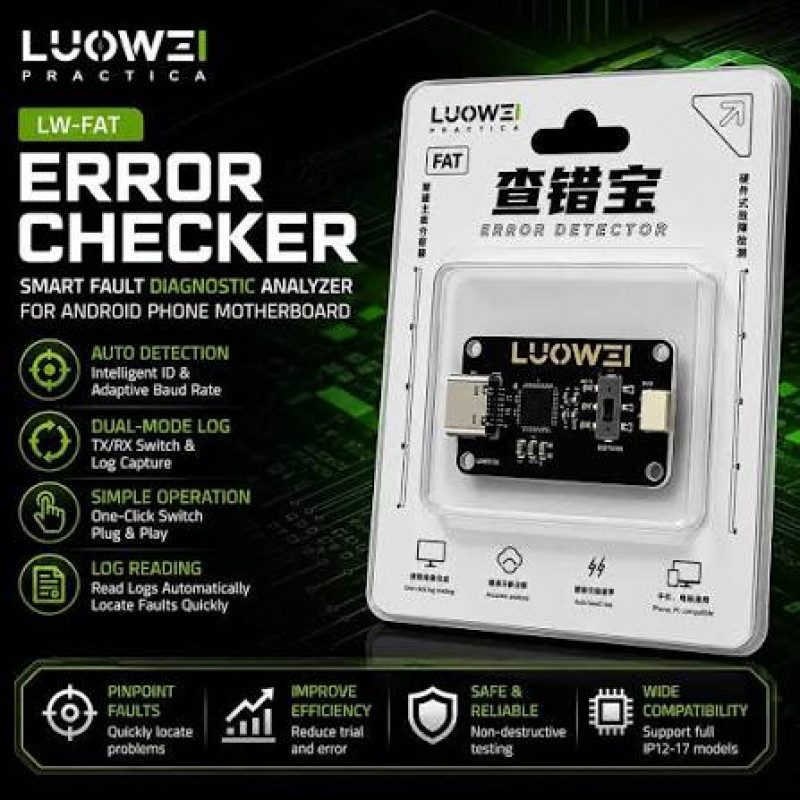
Luowei LW-FAT Error Checker Android Phone Motherboard Smart Fault Diagnostic Analyzer
Luowei LW-FAT Error Checker Android Phone Motherboard Smart Fault Diagnostic Analyzer Features: Android motherboard smart hardware diagnostic terminal with real-time serial port logging, providing clear visibility into low-level logs. Type-C interface wi
- $12.56
-
Quantity Price 1- $12.56
Product is In Stock
Quantity
Categories: BRAND ACCESSORIES/ LUOWEI
Luowei LW-FAT Error Checker Android Phone Motherboard Smart Fault Diagnostic Analyzer
Features:
- Android motherboard smart hardware diagnostic terminal with real-time serial port logging, providing clear visibility into low-level logs.
- Type-C interface with high durability and stable contact; surface-mount component technology ensures solid solder joints and prevents cold solder joints; industrial-grade capacitors and resistors.
- Say goodbye to blind troubleshooting and repeated disassembly and trial-and-error. Pinpoint the root cause of the fault in one go, significantly reducing rework time and doubling the efficiency of smartphone repair and debugging.
How to Use:
- First, connect the FAT cable to the TX pin and GND of the faulty motherboard.
- Connect the FAT to your computer.
- Open the FAT dedicated server webpage.
- Select a baud rate of 115200 to connect to the device. Use the power-on cable to power on the motherboard; the computer will automatically read the logs.
- Click on the webpage to analyze the data.
Package includes:
- 1 x Analyzer
Luowei LW-FAT Error Checker Android Phone Motherboard Smart Fault Diagnostic Analyzer
Features:
- Android motherboard smart hardware diagnostic terminal with real-time serial port logging, providing clear visibility into low-level logs.
- Type-C interface with high durability and stable contact; surface-mount component technology ensures solid solder joints and prevents cold solder joints; industrial-grade capacitors and resistors.
- Say goodbye to blind troubleshooting and repeated disassembly and trial-and-error. Pinpoint the root cause of the fault in one go, significantly reducing rework time and doubling the efficiency of smartphone repair and debugging.
How to Use:
- First, connect the FAT cable to the TX pin and GND of the faulty motherboard.
- Connect the FAT to your computer.
- Open the FAT dedicated server webpage.
- Select a baud rate of 115200 to connect to the device. Use the power-on cable to power on the motherboard; the computer will automatically read the logs.
- Click on the webpage to analyze the data.
Package includes:
- 1 x Analyzer
Please Login / Signup to add your review
